32 languages · Full RTL · AI built in

Project management for every direction

The project management tool that actually works in your language and your direction — native right-to-left, a Hijri calendar in every language, and 32 languages in all. A complete, modern PM tool underneath.

Free forever for up to 3 users. No credit card required.

Artala team capacity view in Urdu, full right-to-left layout with the Hijri calendar
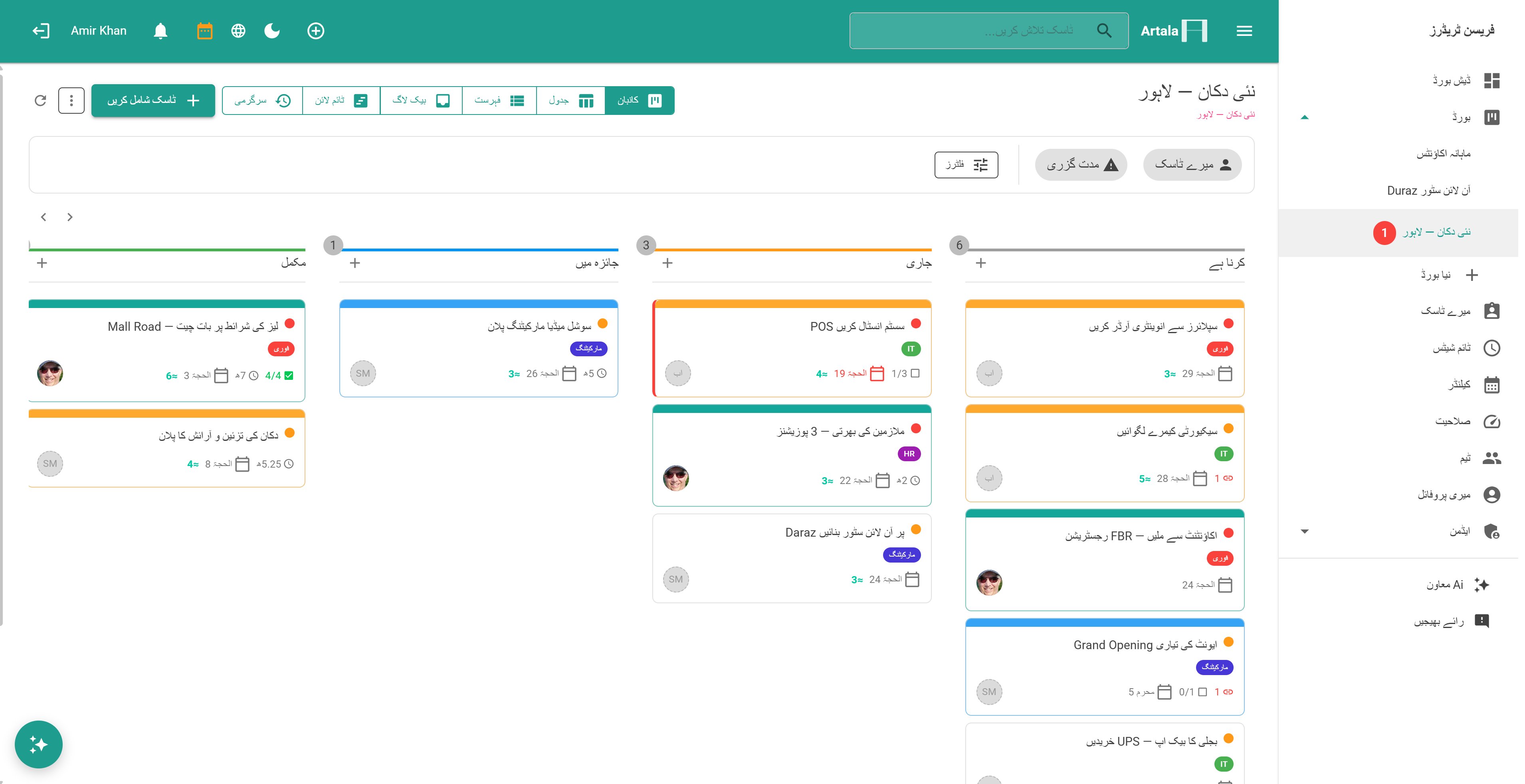
Urdu · Hijri · right-to-leftThe same board — each teammate in their own language
The same Artala capacity view in English, left-to-right with the Gregorian calendar
English · Gregorian · left-to-rightThe same board — each teammate in their own language

Built for every language from day one

Multi-language support wasn't bolted on as an afterthought — it was the original design goal. Artala was built from the ground up for teams who've never had a project management tool in their own language.

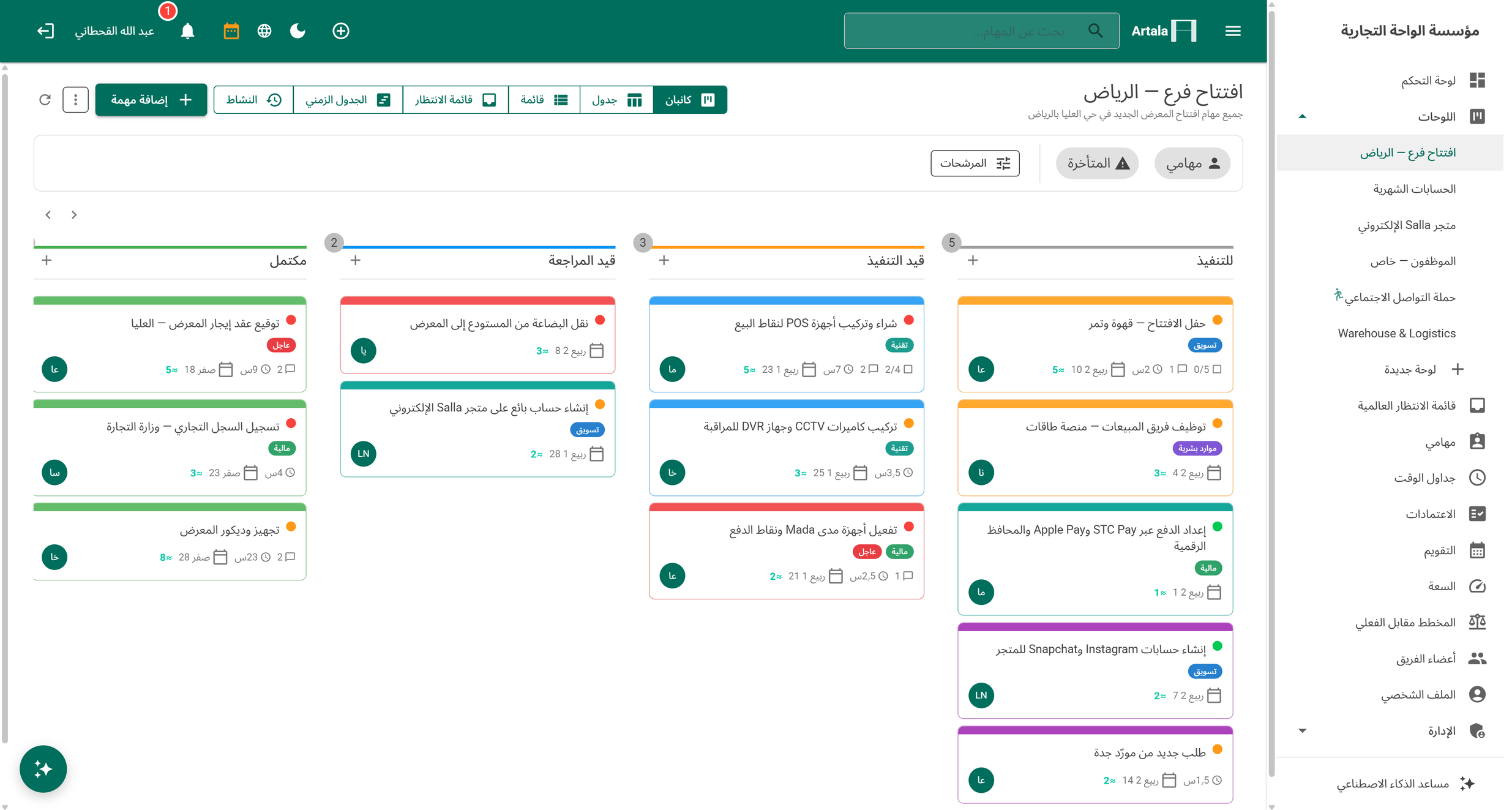
Seven languages render fully right-to-left — Arabic, Hebrew, Urdu, Persian, Kurdish, Pashto, and Sindhi — with true bidirectional text, not mirrored CSS. The Hijri calendar (Umm al-Qura, or adjustable to local moon-sighting) is available in every language. And it all works on one shared workspace: an Arabic-reading user and an English-reading colleague can open the same task and comment thread at the same time and each see it render correctly, in their own language and direction. Localised emails, per-user language and calendar preferences — multilingual teams each work their own way, on the same data.

32
Languages
7
RTL languages
100%
Localised UI & emails
Artala kanban board in Urdu with full right-to-left layout

Everything your team needs

From kanban boards to sprint planning, timesheets to AI — all in one place.

7 views

See your work any way you want

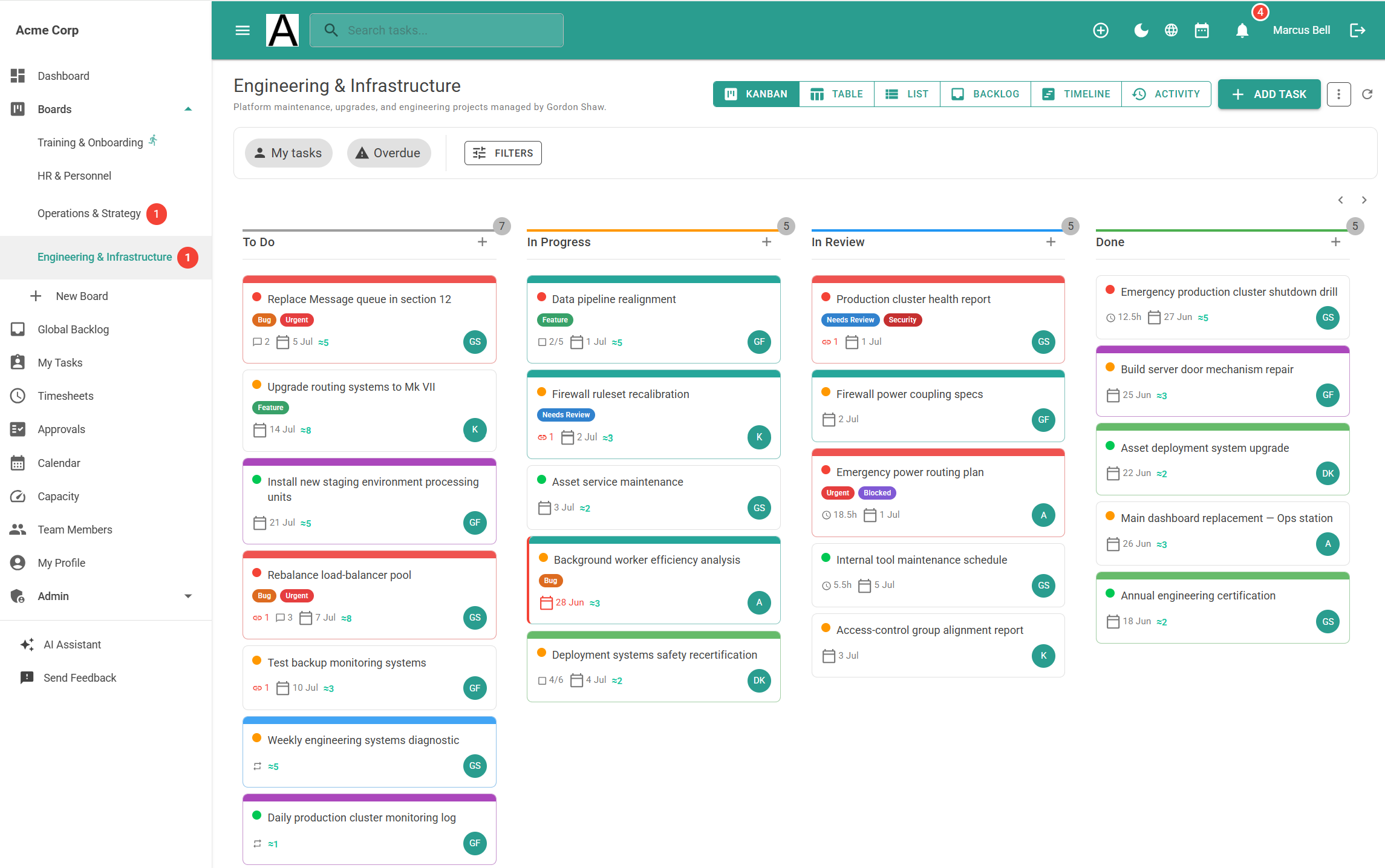
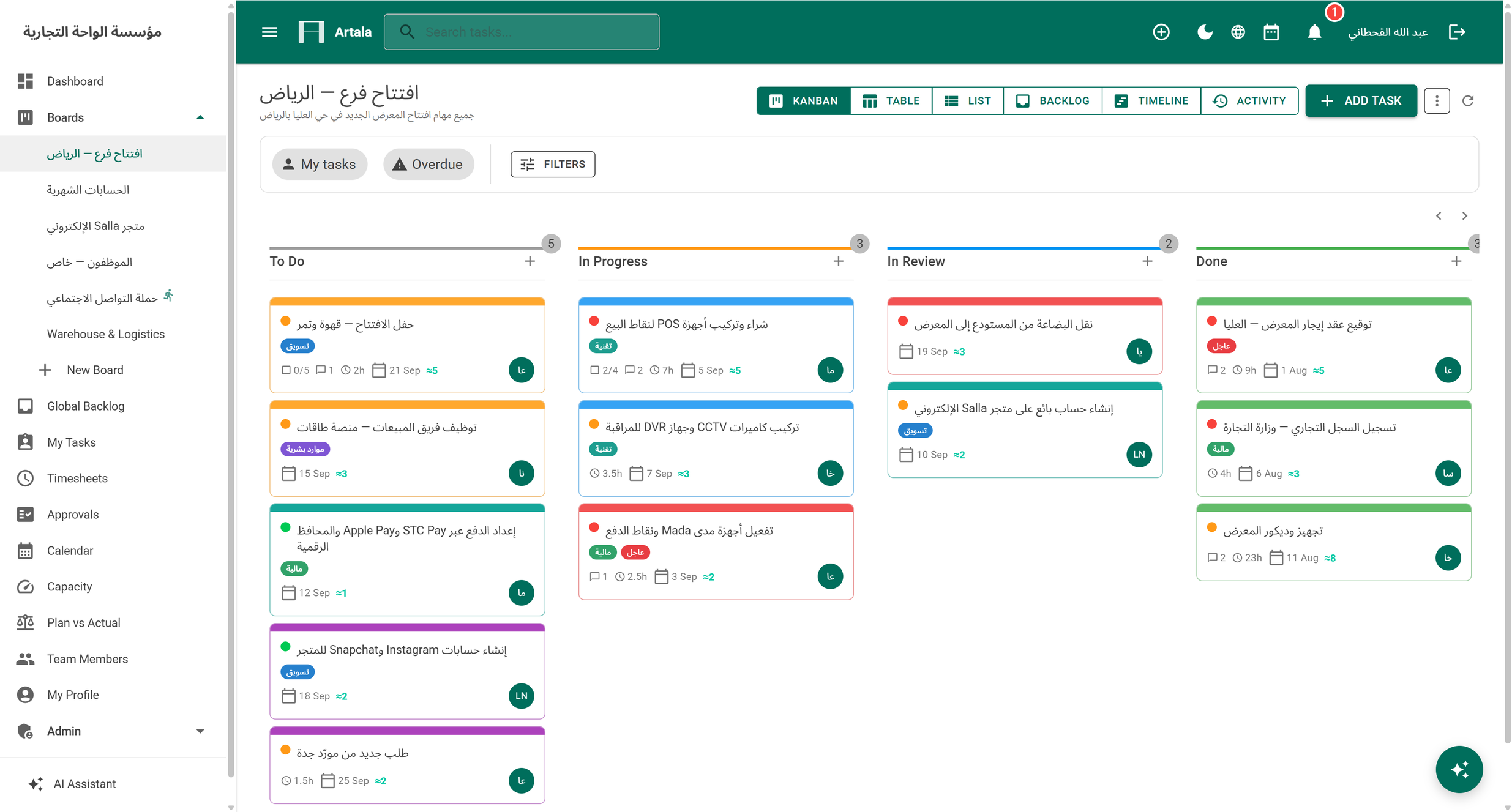
Kanban, List, Table, Calendar, Timeline, Backlog, and My Tasks. Switch views without losing context — everyone works their way. Drag and drop everywhere, including full touch support on mobile.

Kanban view
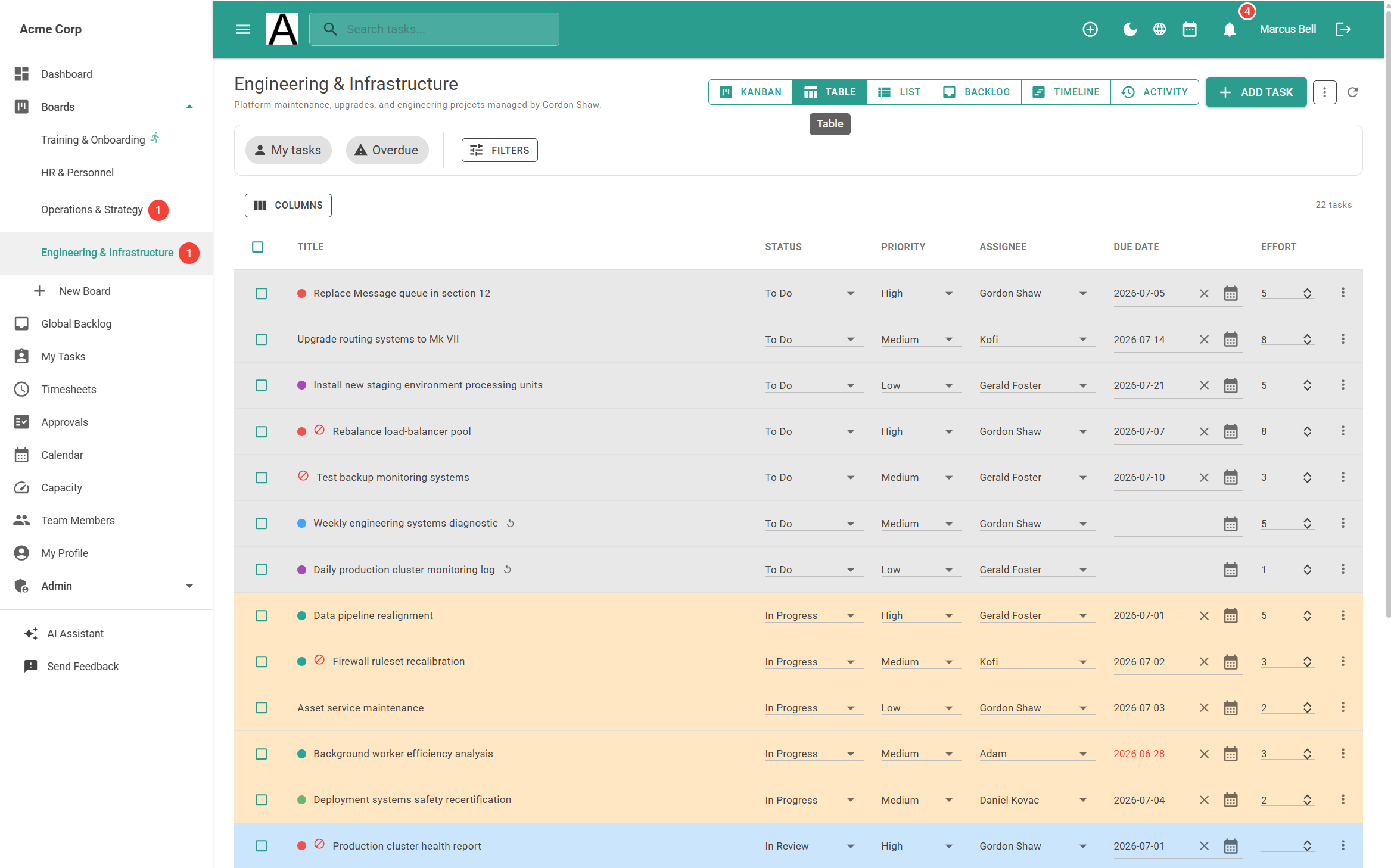
Table view

A spreadsheet that manages projects

Spreadsheet-style grid with configurable columns, inline editing, sorting, filters, and custom fields. If your team lives in Excel, they'll feel right at home — but with statuses, assignees, and due dates built in.

Table view
AI assistant

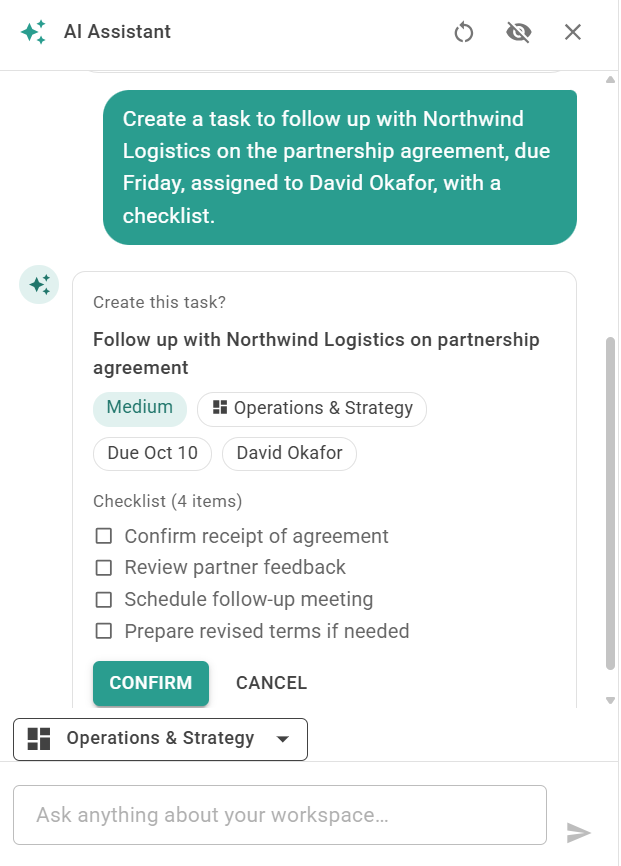
Your workspace has an AI team member

Ask questions about your workspace — "Who has the most overdue tasks?", "How's the current sprint going?", "What should I work on today?" Create tasks in natural language, generate playbook templates, and get AI-written weekly digest summaries. All built in, not bolted on.

AI assistant
Sprint planning

Plan sprints like a dev team

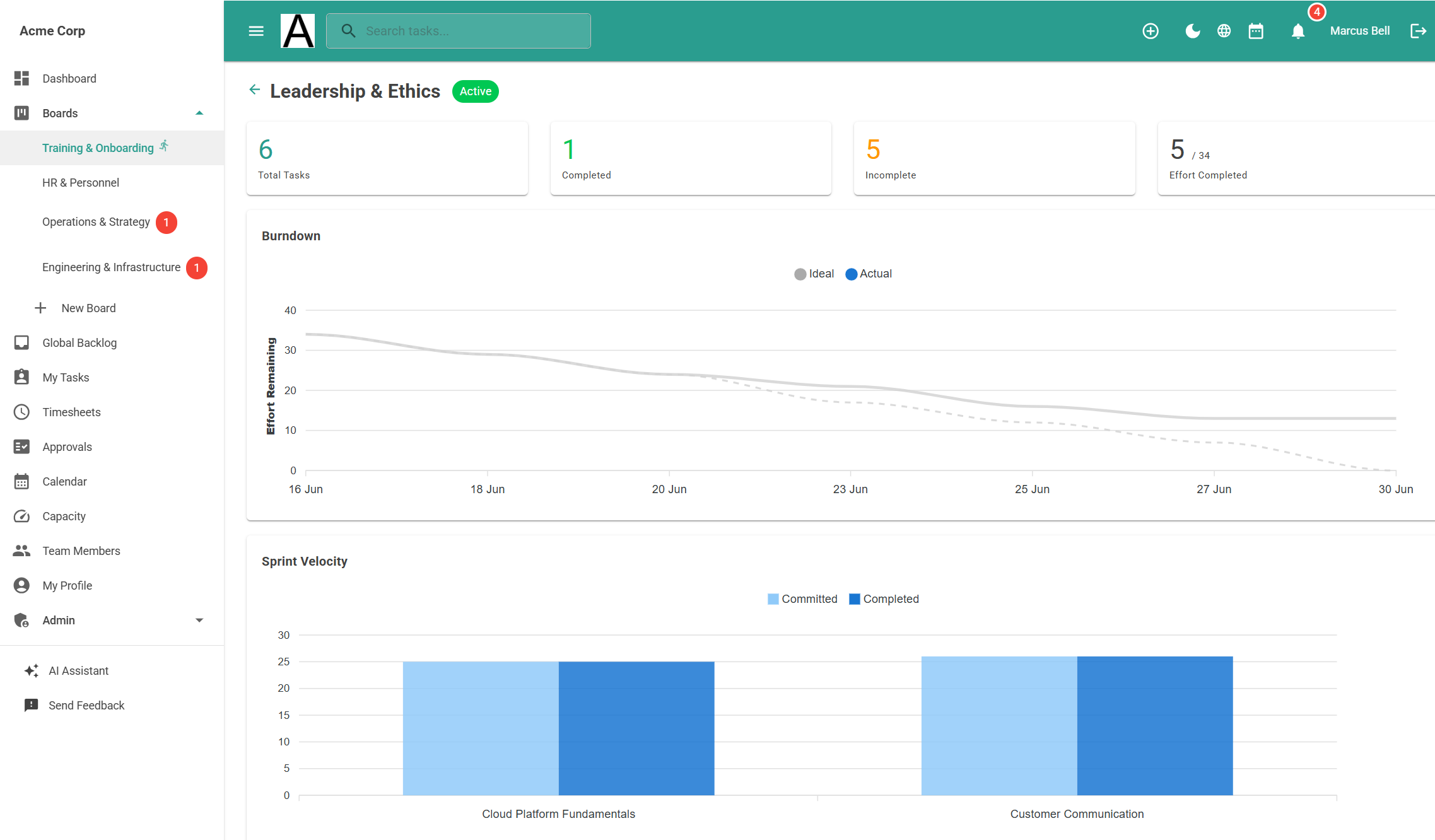
Full sprint lifecycle with drag-and-drop planning, burndown charts, capacity tracking, and per-sprint reports. DevOps-style planning without the enterprise complexity.

Sprint burndown chart
Timesheets

Track time without a third-party tool

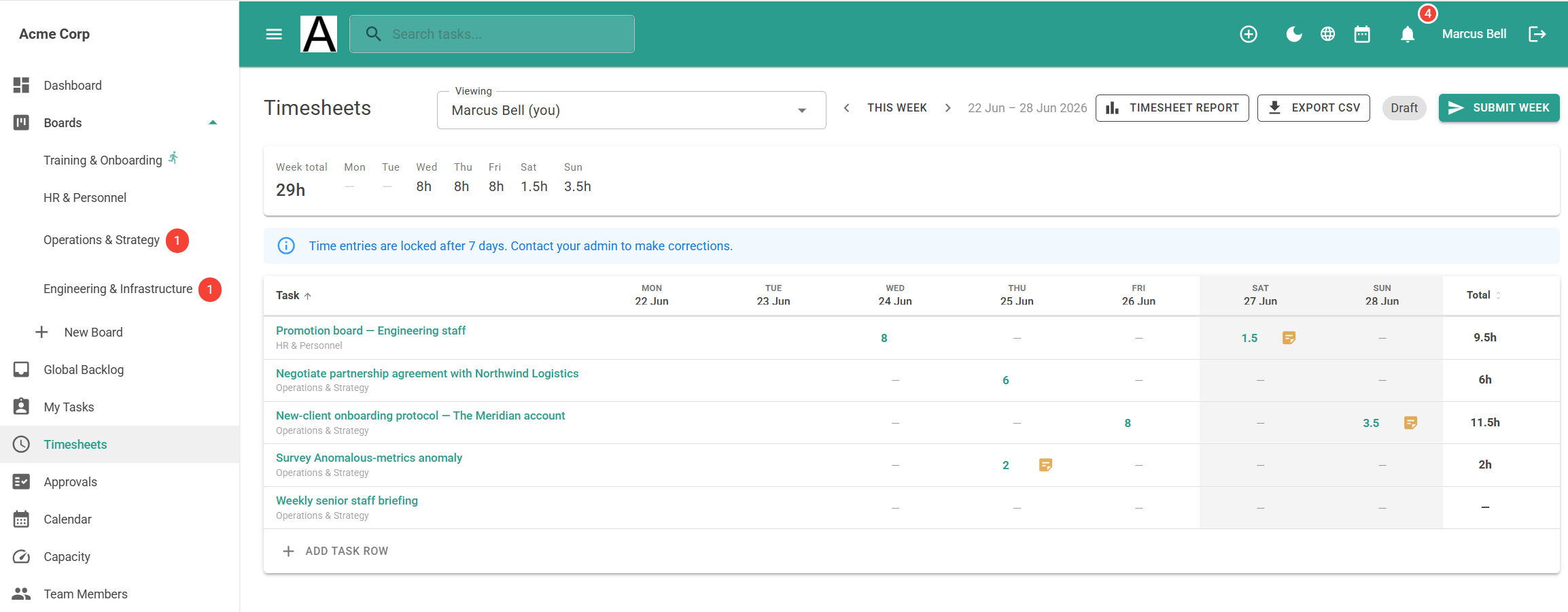
Built-in weekly time tracking grid with lock dates for payroll, proxy editing for managers, and exportable reports — plus an optional approval workflow where team members submit each week and managers review, approve, or send it back. No integrations to configure, no extra subscriptions.

Timesheet view
Playbooks

Turn any process into a reusable template

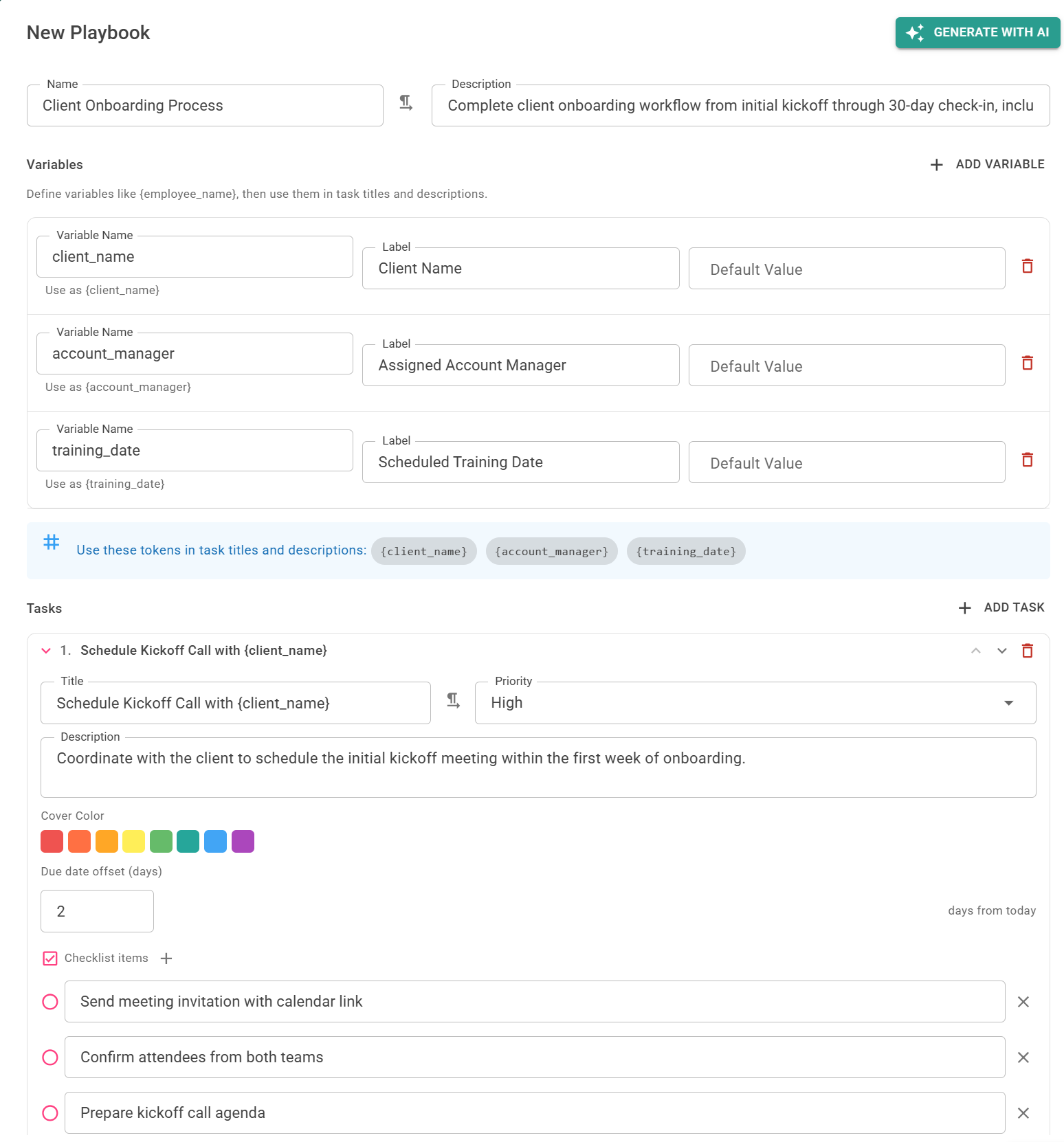
Start from one of five built-in templates — bug tracking, HR onboarding, marketing campaigns, product roadmap, or software sprints — or build your own from scratch. Define stages, default tasks, checklists, and variables, then run a playbook to generate a fully populated board in seconds. Let AI generate a playbook from a natural language description of any workflow.

AI playbook generation
Works everywhere

Full experience on any device

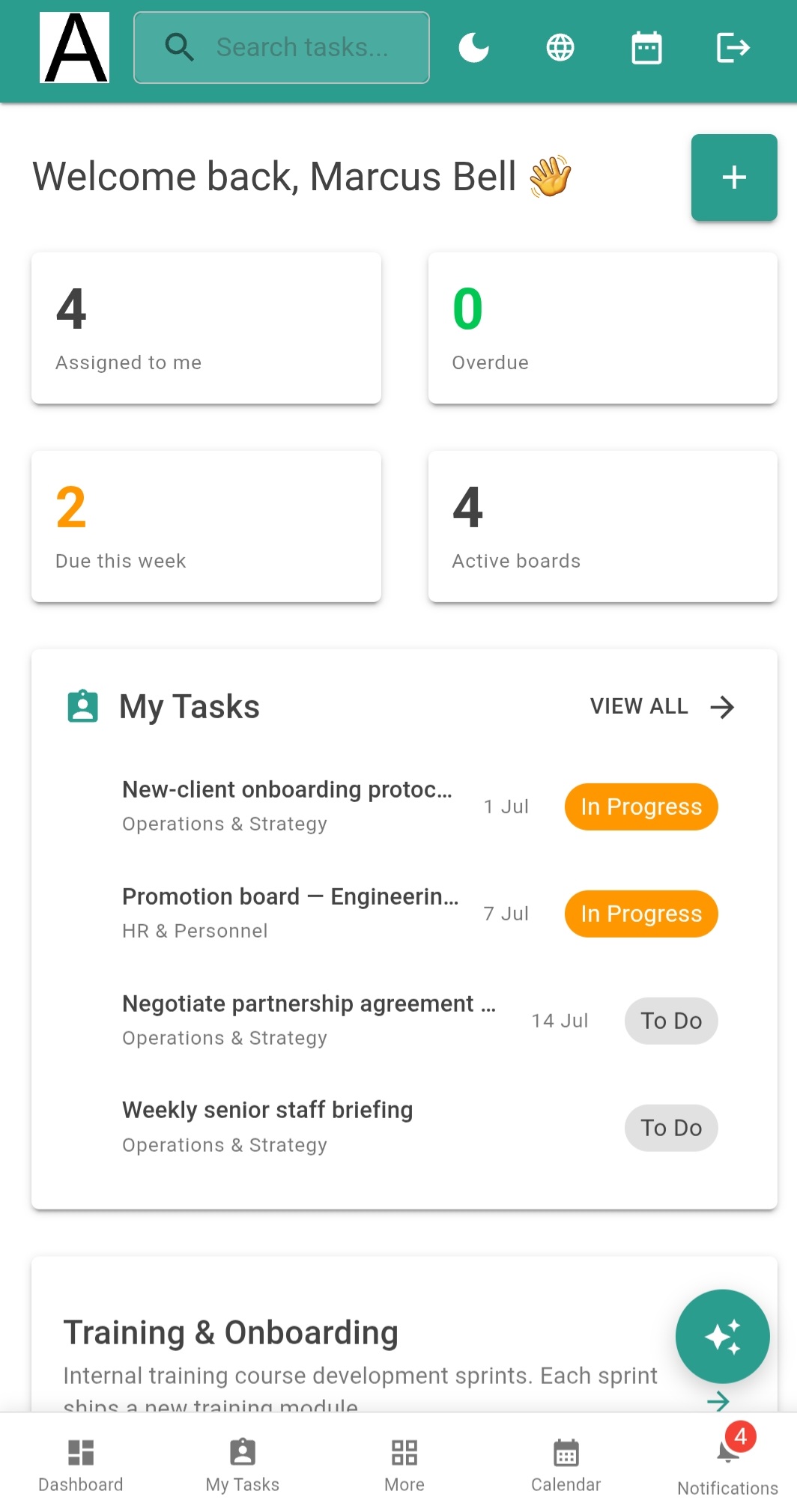
Artala is designed for mobile from the ground up — not a stripped-down companion app, but the same full-featured experience scaled for your phone. Drag-and-drop, touch gestures, responsive layouts, and the same 32 languages. Manage your team from anywhere.

Artala on mobile

Automations

Trigger actions on status changes, due dates, and assignments. Automate the repetitive work so your team can focus on what matters.

🔐

Roles & permissions

Five workspace roles plus five board-level roles. Owner, Admin, Member, Commenter, Viewer — control exactly who can do what, per board.

🔗

API, webhooks & OData

HMAC-signed webhooks with delivery logs, API keys with actor attribution, and OData feeds for BI tools. Developer-grade integration.

📊

Reports & audit

Full field-level task history, tenant audit log, sprint burndown, timesheet reports, and workspace backup with restore.

🔁

Recurring tasks

Daily, weekly, monthly, or custom recurrence rules. Set it once — your tasks keep creating themselves on schedule.

📝

Custom fields & statuses

Add text, number, select, and date fields to any board. Create custom status workflows that match how your team actually works.

🕌

Hijri calendar & regional weekends

Native Hijri calendar in every language — not just Arabic. Date pickers, calendar view, and timeline all render in Hijri months. Choose the authoritative Umm al-Qura (Saudi) calendar, or an adjustable Hijri mode you tune to your region's local moon sighting — per user or per workspace. Configure weekend days to match your region — Friday/Saturday, Thursday/Friday, Friday-only, or any combination — and your calendar and timesheets adjust automatically.

📥

Import from anywhere

Switching tools? Import your Trello boards from a JSON export — lists, cards, labels, checklists, and members all come across. Or upload a CSV or Excel file from Asana, Jira, Monday.com, ClickUp, Linear, or GitHub Issues — columns are auto-detected and mapped for you. See all integrations →

👁️

Share with clients

Generate read-only share links for any board — clients and stakeholders see progress without needing an account. Set expiry dates, add labels, and revoke access instantly when you're done.
The full feature list

Everything included with Artala Pro.

Views & planning

  • Kanban board with drag-and-drop
  • List view with inline editing
  • Table view (spreadsheet-style grid)
  • Calendar view (month & week)
  • Hijri (Islamic) calendar mode
  • Configurable weekend days per workspace
  • Timeline view (Gantt-style)
  • Activity feed view (per-board history)
  • Backlog (per-board & global)
  • My Tasks (cross-board view)
  • Dashboard (assigned, due this week, overdue)
  • Sprint planning with burndown
  • Capacity planner (weekly workload per member)
  • Filters by assignee, label, priority, status & fields
  • Light & dark mode

Task management

  • Custom fields (text, number, select, date)
  • Custom statuses per board
  • Priority levels (High, Medium, Low)
  • Labels & colour coding
  • Checklists
  • File attachments
  • Inline images in comments
  • @mention notifications
  • Recurring tasks
  • Bulk edit, assign & archive
  • Card covers & effort points
  • Task dependencies

AI & automation

  • AI workspace assistant
  • AI task creation from natural language
  • AI playbook generation
  • 5 built-in board templates
  • Smart due date suggestions
  • AI weekly digest summaries
  • Anomaly detection
  • Workflow automations
  • Playbook templates with variables

Time & reporting

  • Timesheets with weekly grid
  • Timesheet approval workflow
  • Lock dates for payroll
  • Proxy time entry
  • Timesheet reports & OData export
  • Sprint burndown charts
  • Full field-level task history
  • Tenant audit log
  • Workspace backup & restore

Integration

  • Import from Trello (JSON — boards, cards, labels, checklists)
  • Import from CSV & Excel (auto-detects Asana, Jira, Monday.com, ClickUp, Linear, GitHub)
  • HMAC-signed webhooks
  • Webhook delivery log & retry
  • API keys with actor attribution
  • OData feeds for BI tools
  • Email notifications (32 languages)
  • Real-time in-app notifications
  • Weekly email digest with AI summary
  • Real-time updates (SignalR)

Security & compliance

  • 5 workspace + 5 board roles
  • Read-only share links for clients
  • Two-factor authentication (TOTP)
  • Session management & revocation
  • GDPR account self-deletion
  • Personal data export
  • Transfer ownership
  • Tenant branding (logo & colours)

Simple, transparent pricing

Start free. Upgrade when you need more.

Free

$0

For individuals and small teams getting started.

  • Up to 3 users
  • Up to 3 boards
  • Kanban, List, Calendar & Table views
  • Webhooks
  • 32 languages & full RTL
Get started

Try it before you sign up

Explore a fully populated workspace with boards, tasks, sprints, and time entries. No account needed.

English

Acme Corp

A complete workspace with 5 boards, sprint planning, timesheets, playbooks, and AI features. See everything Artala can do.

Workspace: acme
Email: bell@acme.demo
Password: Password123!
Open live demo
اردو · RTL

فریسن ٹریڈرز

A Pakistani trading company workspace in Urdu — full RTL layout, an adjustable Hijri calendar users can tune to local moon-sighting, Friday/Saturday weekends, and mixed Urdu/English content.

Workspace: friesentraders
Email: demo@friesentraders.demo
Password: Password123!
Open live demo
العربية · RTL

مؤسسة الواحة التجارية

A Saudi retail business workspace in Arabic — full RTL layout, the accurate Umm al-Qura Hijri calendar, Friday/Saturday weekends, a Salla store, and mixed Arabic/English content.

Workspace: alwaha
Email: demo@alwaha.demo
Password: Password123!
Open live demo

Demos reset at 02:00 UTC daily. Any changes you make will be restored overnight.

Your language, your direction

Every language gets the full experience — translated UI, localised emails, per-user preferences. On one shared workspace, an Arabic reader and an English reader see the same tasks and comments at the same time, each rendered correctly in their own direction — the part a "supports 32 languages" checkbox doesn't deliver.

🇬🇧 English
🇺🇸 English (US)
🇸🇦 Arabic RTL
🇮🇱 Hebrew RTL
🇵🇰 Urdu RTL
🇵🇰 Pashto RTL
🇵🇰 Sindhi RTL
🇮🇷 Persian RTL
🇫🇷 French
🇪🇸 Spanish
🇩🇪 German
🇮🇹 Italian
🇧🇷 Portuguese
🇳🇱 Dutch
🇵🇱 Polish
🇸🇪 Swedish
🇹🇷 Turkish
🇨🇳 Chinese
🇯🇵 Japanese
🇰🇷 Korean
🇮🇳 Hindi
🇮🇩 Indonesian
🇻🇳 Vietnamese
🇰🇪 Swahili
🇹🇭 Thai
🇲🇾 Malay
🇧🇩 Bengali
🇱🇰 Tamil
🇷🇴 Romanian
🇨🇿 Czech
🇵🇭 Filipino
☀️ Kurdish RTL

Up and running in 5 minutes

From sign-up to your first board — here's what the process looks like.

1

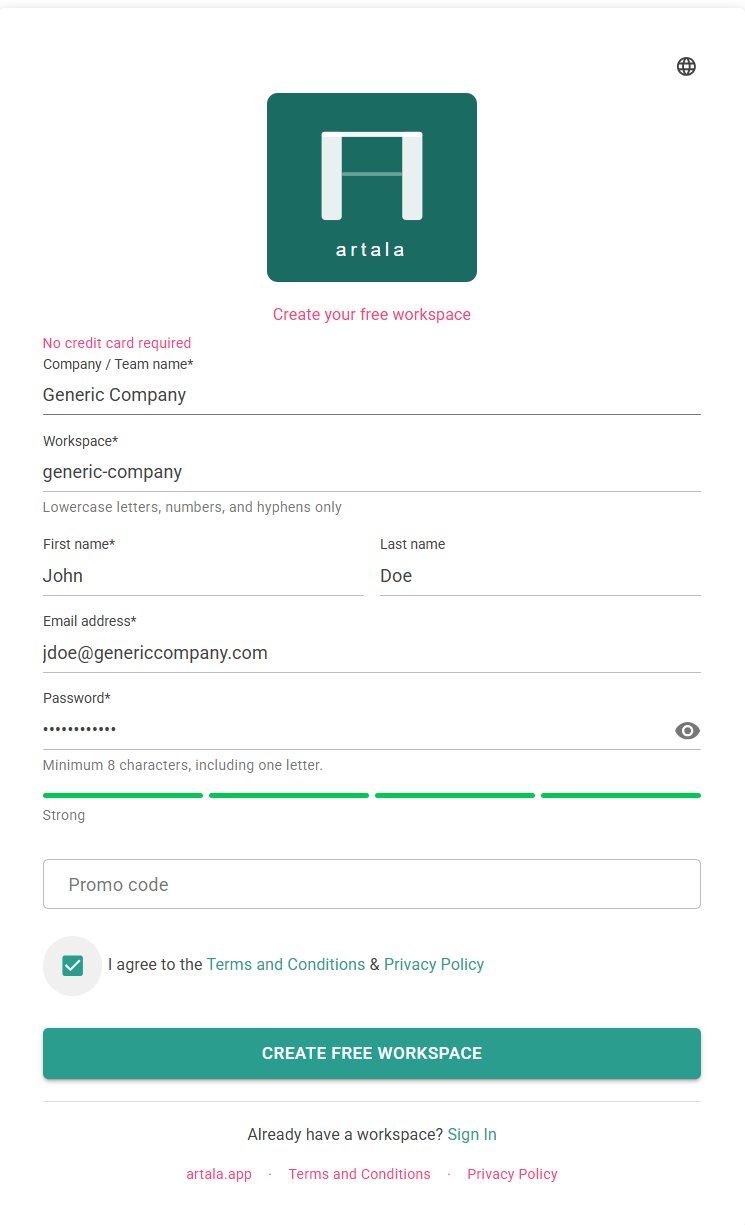
Create your workspace

Sign up with your email and choose a workspace name for your team. No credit card required — your 14-day trial starts with full access to every feature.

Registration
2

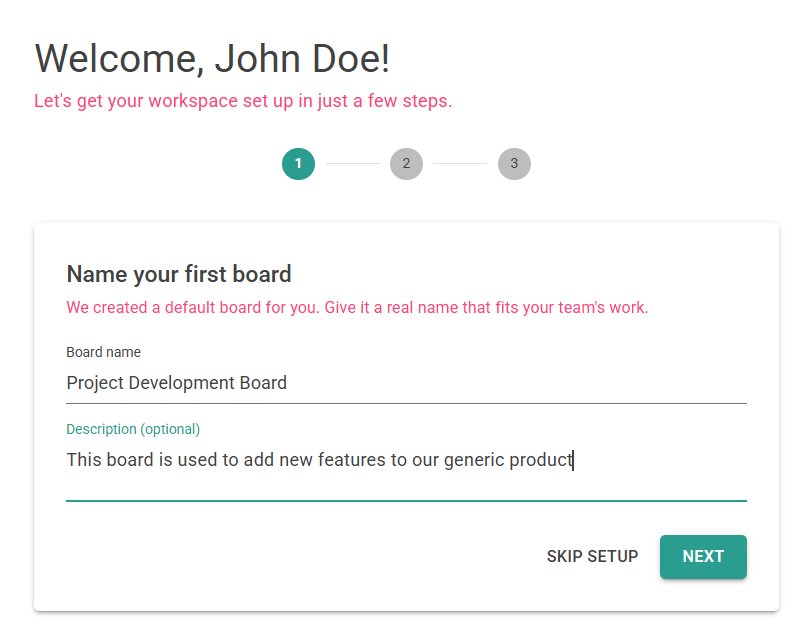
Name your first board and add tasks

The onboarding wizard walks you through creating your first board and adding tasks. Give it a name that matches your project — you can always create more boards later.

Onboarding wizard
3

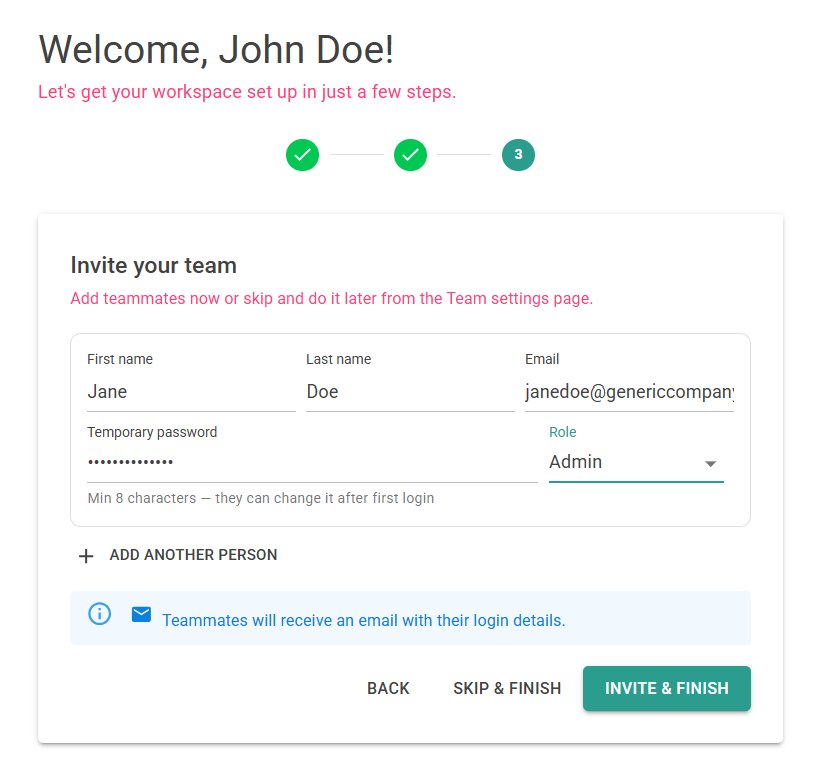
Invite your team

Add team members by email — they'll receive an invitation to join your workspace. Assign roles (Admin, Member, Commenter, or Viewer) to control who can do what.

Team invitation
4

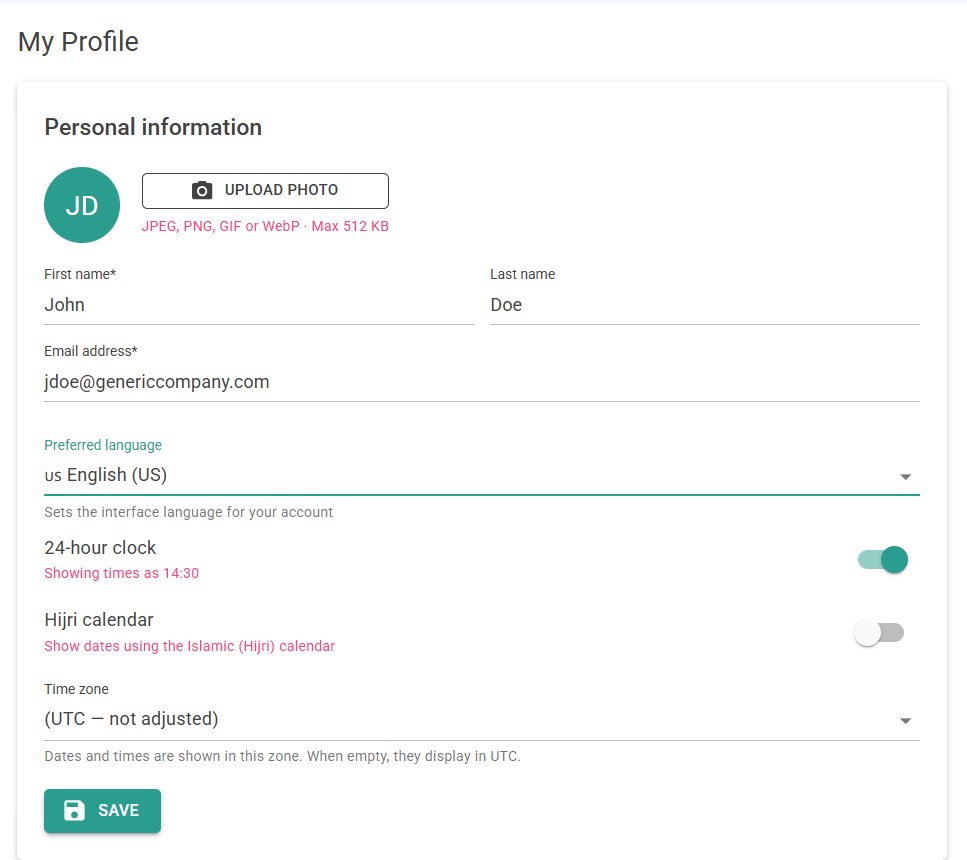
Choose your language and calendar

Each team member picks their own interface language from 30 options. Enable the Hijri calendar and configure your weekend days in Workspace Settings — the whole team benefits instantly.

Language selection
5

Start working

Drag tasks between columns, assign work, track time, run sprints, and share boards with stakeholders. Everything works on desktop, tablet, and mobile — no app download required.

Read the full Setup Guide →

Frequently asked questions

Is Artala really free?

Yes. The free plan supports up to 3 users and 3 boards with no time limit. When you need more, the Pro plan is $7 per user per month. Every new workspace starts with a 14-day trial of Pro so you can try everything before deciding.

Do I need to install anything?

No. Artala runs entirely in your browser — desktop, tablet, or phone. On mobile, you can add it to your home screen as a progressive web app (PWA) for an app-like experience without downloading from an app store.

How does the RTL support work?

When you select an RTL language (Arabic, Hebrew, Urdu, Pashto, Sindhi, Persian, or Kurdish), the entire interface mirrors automatically — navigation, boards, cards, forms, and text direction all flip. This is not a CSS override or an add-on; the layout engine is RTL-aware from the ground up. Each team member can use a different language in the same workspace.

What is the Hijri calendar?

The Hijri (Islamic) calendar is used alongside the Gregorian calendar in many parts of the world. Artala lets each user toggle Hijri dates on or off independently, and it works in all 32 languages — not just Arabic. The calendar uses the Umm al-Qura system (the Saudi civil calendar). Local dates determined by moon sighting — for example in Pakistan or Indonesia — can differ by a day, so each user can nudge their displayed Hijri dates by up to two days to match their local calendar.

Can different team members use different languages?

Absolutely. Language is a per-user setting, not a workspace setting. A team in Dubai might have members using Arabic, Urdu, and English — all seeing the same boards and tasks, each in their own language. Task content (titles, descriptions) appears as written; only the interface elements translate.

Is my data secure?

Artala uses row-level security (RLS) in the database so each workspace's data is isolated at the query level — not just in application code. All connections are encrypted with TLS. The platform runs on Microsoft Azure infrastructure in the EU (West Europe region). Two-factor authentication, session management, and GDPR data export are all built in.

Can I integrate Artala with other tools?

Yes. Artala provides a REST API with 52 documented endpoints, API key authentication, and real-time webhooks for events like task creation, completion, and assignment. You can connect Artala to automation platforms, messaging tools, or custom internal systems.

What happens when my trial ends?

After 14 days, your workspace moves to the free plan (3 users, 3 boards). All your data is preserved — nothing is deleted. You can upgrade to Pro at any time to unlock unlimited users, boards, and features. If you have a promo code, enter it when creating your workspace to receive an extended trial period.

How do I get help?

Email us at support@artala.app. You can also explore the User Guide for detailed feature documentation and the Setup Guide for workspace configuration help.

Ready to get your team organised?

Free for up to 3 users. Set up in minutes, no credit card required.

Start for free